StarMaker: Sing Karaoke Songs
- 4.3
- Rating
- 500.00M
- Installs
- Free
- Price

 Analysis by App-foxy
My first impression of StarMaker: Sing Karaoke Songs was that it feels less like a simple karaoke player and more like a practice room with a social layer attached. I can choose a song, record my voice, make basic improvements, and share the result without moving between several separate apps. That makes it approachable for someone who wants to sing casually, but there is enough editing and learning support to keep the experience interesting after the first recording.
It is a free Music & Audio app from SKYWORK AI PTE. LTD., aimed at Teen users. The app has been around since Nov 11, 2013, and its scale is hard to ignore: it has passed 500 million installs, with a 4.4 average from around 3.9 million ratings and roughly 39 thousand written reviews. Those figures do not guarantee that every singer will enjoy it, but they do suggest that StarMaker has become a familiar destination for people who want to perform from a phone.
What to expect before you record
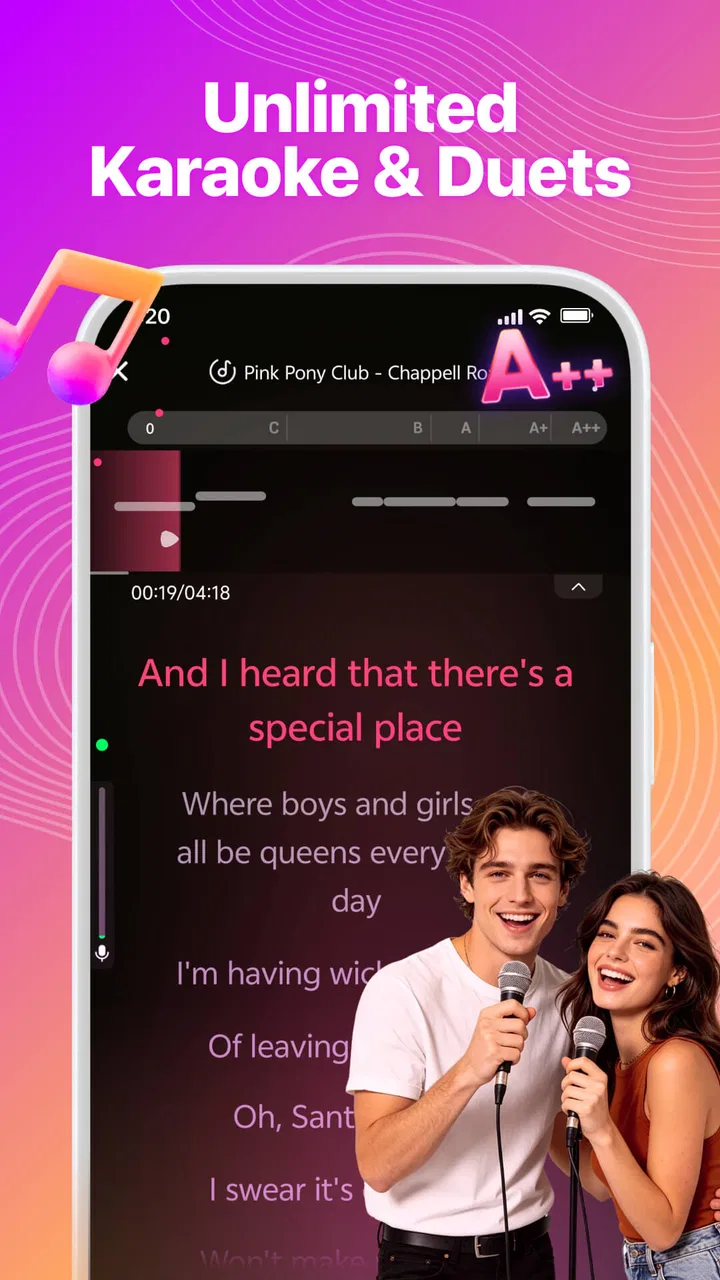
The core experience is straightforward: pick a karaoke song, follow the vocal guide, record your part, and then work on the result with the available audio tools. The important distinction is that this is not designed only for people who already know how to sing. A beginner can use it as a low-pressure way to test pitch and timing, while a more confident singer can treat the recording as a small production rather than a disposable voice memo.
In-Depth Coverage of StarMaker: Sing Karaoke Songs
I would describe the app as a middle ground between a traditional karaoke catalog and a lightweight social music platform. A conventional karaoke app is often best when the goal is simply to display lyrics and play backing music. A dedicated audio editor usually gives more control over a finished recording but expects the user to understand tracks, effects, trimming, and exporting. StarMaker sits between those approaches: it keeps the song choice and performance at the center, then adds enough editing to make a take feel presentable.
That balance is also the first trade-off. If I want complete control over a mix, a professional digital audio workstation is the better tool. If I only want to sing a familiar song privately with no social distractions, a basic karaoke player may feel calmer. StarMaker makes the most sense when I want the act of singing, improving, and sharing to happen in one place.
The app is free to download, though in-app purchases range from $0.49 to $199.99 per item. I would approach that carefully as a first-time user. The free entry point is useful for testing whether the recording workflow suits me, but I would not spend money before trying several songs and understanding which parts of the experience I actually use. A free app can still become expensive when optional purchases are treated as part of the normal routine.
Why the first recording matters
The most useful early goal is not producing a perfect performance. It is completing one recording that lets me hear what I need to improve. That might mean noticing that I enter a chorus too late, run out of breath before a long phrase, or sing more quietly than I expected. The app becomes much more valuable when I use those observations for the next take instead of judging the first attempt only as good or bad.
For that reason, I recommend choosing a song with a comfortable range rather than the song I most admire. A familiar track can be tempting, but a melody that sits too high or low will make the first session frustrating. A simpler song gives the vocal guide, lyrics, and recording controls room to do their job. Once I understand how the interface behaves, I can return to more demanding material with better expectations.
Getting set up without unnecessary frustration
After installing the current version, 9.5.2, I would begin by checking the phone itself rather than immediately searching for a difficult song. StarMaker supports Android devices running 6.0 or later, so compatibility is not a concern for many modern phones, but the quality of the session still depends on the microphone, headphones, and surroundings. A quiet room and wired headphones, when available, usually give me a clearer sense of my voice than a noisy room and the phone speaker.
Headphones are especially helpful because they reduce the chance that the backing track will leak into the microphone. That leakage can make the recording sound less clean and can confuse my judgment about whether I am singing in time. I would keep the headphone volume moderate, place the phone at a stable distance, and avoid holding it in a way that covers the microphone. These are small adjustments, but they matter more than adding dramatic effects later.
The first setup should also include a realistic decision about privacy and sharing. StarMaker is built around performing and sharing music, so I should pause before publishing a take simply because the app makes sharing convenient. I can treat the first few recordings as practice material, listen back, and decide whether I am comfortable showing them to other people. That habit is particularly sensible for younger users because the content rating is Teen.
When I open the song area, I would not spend ten minutes searching for the most popular option. I would choose something I know well enough to recognize when the lyrics and melody arrive. Familiarity reduces the mental load of reading, listening, and singing at the same time. It also makes the first successful action more likely, which is exactly what a new user needs.
A practical route to the first meaningful success
My preferred first-session routine is simple. I select a comfortable song, listen to enough of the opening to understand its pace, and begin with a modest performance rather than trying to imitate the original singer. I focus on entering each line on time and finishing the phrases. If the result is uneven, that is useful information, not a failed installation.
You May Also Like

 AccuWeather: Weather Radar
AccuWeather Review: A Quick, Clear Forecast for Everyday Decisions
For everyday plans, the best forecast is the one you can understand quickly. AccuWeather makes rain timing, radar, and local conditions easy to act on, with a few trade-offs.

 Hill Climb Racing
Why Hill Climb Racing Still Turns Crashes Into One More Run
A tiny car, a bumpy hill and one more upgrade: Hill Climb Racing keeps resurfacing because its simple chaos makes every near-miss feel personal.

 AliExpress - Shopping App
AliExpress Makes Global Shopping Feel Personal, but Shoppers Bear the Risk
AliExpress turns a global marketplace into a pocket-sized discovery engine. Its reach is useful, its shopping loop compelling, and its trade-offs easy to miss.

 Lords Mobile: Kingdom Wars
Lords Mobile Is a Kingdom-Building Routine, Not a Quick Match
A case-by-case verdict on the building, battles, device demands, and social commitments that make Lords Mobile rewarding for some players and exhausting for others.

 PDF Scanner app - TapScanner
TapScanner Makes Paperwork Easier to Capture, Check, and Share
TapScanner makes scanning with a phone feel less like a rescue operation and more like a dependable step in getting work done. Its capture tools are useful, though not flawless.

 Block Blast!
Block Blast! Shows How Much a Puzzle Game Can Leave Out
A quiet grid game shows why puzzle players increasingly value instant clarity, repeatable skill and low-pressure play—and where the genre still needs to catch up.
More From Our News Desk
View All News


After recording, I listen once without editing. On the second listen, I pay attention to one issue only, such as timing or volume. This prevents me from changing every available control at once. I then use the audio editor to make a restrained adjustment and compare the result with the original take. The comparison is more informative than relying on memory, especially when a small effect makes a recording seem more polished without actually improving the singing.
The best beginner workflow is record, listen, change one thing, and record again. That sequence turns StarMaker into a practical learning tool instead of a filter machine. It also protects me from a common mistake: using effects to hide problems that would be easier to fix through breathing, positioning, or choosing a better key for my voice.
For a realistic everyday scenario, imagine that I have ten quiet minutes after work and want to relax without committing to a full music lesson. I can choose a song I already know, record one verse and chorus, listen for where I lose timing, and try the same section again. That is short enough to repeat regularly. Over time, the benefit comes from comparing attempts and becoming more comfortable hearing my own voice, not from chasing a flawless performance every evening.
Where new users can get confused
The first point of confusion is the difference between singing and editing. A polished sound does not necessarily mean a stronger performance. Audio effects can change the character of a vocal, but they cannot reliably correct a melody that is consistently off pitch or a line that starts late. I use editing after I have made the cleanest natural take I can, not before.
Another source of uncertainty is the social side. A shared recording can feel like a finished product simply because it appears in a public-facing environment, but I would still treat it as a personal performance. I listen with headphones, check the whole recording, and consider whether the lyrics, background noise, and vocal level represent what I intended. That extra pause is worthwhile because sharing is much easier than taking back an impulsive decision.
Users may also wonder whether they need to be good singers before starting. In my experience, no. The app is more forgiving when I choose a manageable song and accept that the first recording is diagnostic. It becomes less suitable if I expect automatic correction to transform a weak take into a convincing studio vocal. The learning tools can support practice, but they do not replace practice.
There is also a practical difference between using the app for occasional fun and using it as a serious recording environment. For casual sessions, the integrated workflow is convenient. For a carefully arranged song with multiple instruments, detailed automation, or advanced mixing requirements, I would move the project to a specialist editor. StarMaker is strongest before that level of complexity, when the main question is, “How did my singing sound, and how can I make the next take better?”
Making the editor work for you
I get better results when I treat the editor as a finishing stage rather than a collection of buttons to test randomly. First I correct obvious balance problems, such as a vocal that is difficult to hear against the backing track. Then I make only small tonal changes. A heavy effect may sound exciting for a few seconds but can make pronunciation less clear and reduce the sense that I am actually singing the song.
One useful habit is keeping a plain version of a take before experimenting. That gives me a reference and makes it easier to recognize whether an adjustment genuinely helps. It also prevents the familiar trap of forgetting how the original sounded after several increasingly strong edits. For singers who are learning, the unedited recording is often the most honest feedback available.
I would also record in sections when a complete performance feels intimidating. Working on a verse or chorus lets me focus on breath control and timing without worrying about an entire song. Once that section feels comfortable, I can attempt a longer take. This approach is particularly helpful for people who lose confidence after one mistake and restart repeatedly; a shorter target makes practice feel achievable.
Duets and shared performances add another useful angle. They can make practice more social and reduce the pressure of carrying every part alone, but they also introduce timing and balance considerations. I would listen carefully to how my voice sits beside the other performance instead of assuming that a duet automatically sounds balanced. If my part is too quiet or arrives late, the shared format can reveal that more clearly than solo practice.
Who will enjoy it, and who should choose something else
StarMaker is a strong fit for people who want an easy path from song discovery to recording. It suits beginners who need encouragement, casual singers who enjoy sharing performances, and experienced hobbyists who want a quick way to capture a vocal idea. It is also useful for anyone who learns better by hearing a mistake immediately and trying again rather than reading about vocal technique in the abstract.
I would be more hesitant to recommend it to someone who wants a completely private, distraction-free practice tool. The social atmosphere is part of the appeal, but it may not be what every singer wants. It is also not my first choice for detailed music production, serious vocal arrangement, or precise studio work. A dedicated editor will usually offer deeper control, while a plain karaoke application may be preferable for someone who only wants lyrics and backing music.
The purchase structure is another reason to move slowly. Since the app is free to start but includes optional items across a wide price range, I would use the free experience long enough to identify a genuine need before buying anything. A newcomer should not feel that spending is required to validate their voice. The most important early improvement comes from song choice, listening, microphone position, and repeated practice.
What to do after the first successful recording
Once I have one recording I am reasonably happy with, I would create a small personal routine instead of immediately jumping between unrelated songs. I might keep one comfortable song for confidence, one song that challenges timing, and one song that helps me practice a difficult vocal range. This gives each session a purpose and makes progress easier to notice.
I would also compare recordings by listening for specific changes. Is the entrance cleaner? Are the quiet lines audible? Do I finish the last words of each phrase? These questions are more useful than asking whether I sound like a professional vocalist. StarMaker can help me hear the evidence, but I still need to decide what the evidence means and what to change next.
If sharing is part of the appeal, I would publish selectively. A recording does not need to be perfect, but it should be intentional. I check the beginning and ending, listen for accidental noise, and make sure the vocal effect supports rather than overwhelms the performance. That small review step makes the social side more enjoyable because I am sharing a choice, not merely uploading the first available take.
For users wondering whether the app is worth keeping, my answer depends on the role they want it to play. If I return to it because recording lowers the barrier to regular singing, then it earns its place on my phone. If I only use it to apply effects once and never listen back, a simpler karaoke option may be enough. The value is in the repeatable path from attempt to feedback to another attempt.
Overall, I see StarMaker as a friendly starting point for phone-based karaoke with more depth than a basic sing-along player. Its biggest strength is the complete journey: choose a song, perform it, shape the audio, learn from the result, and decide whether to share. Its biggest limitation is that convenience and social features can distract from the actual practice. I recommend beginning with one familiar song, modest editing, and no pressure to publish. For a free app with a mature history and a large audience, that is a reassuring way to discover whether its particular mix of karaoke, learning, and community fits the way you like to make music.
FAQs for StarMaker: Sing Karaoke Songs
01What features does StarMaker offer for karaoke enthusiasts?
StarMaker provides a wide range of features for karaoke lovers, including a vast library of songs across various genres, high-quality audio effects, and duet functionality to collaborate with friends or other users. Additionally, you can record your performances, share them on social media, and participate in singing challenges to showcase your talent.
02Is StarMaker free to use, or are there in-app purchases?
StarMaker is free to download and use, offering many songs and features at no cost. However, it also includes in-app purchases and a VIP subscription that unlocks additional songs, premium effects, and ad-free usage. This option is great for those who want an enhanced experience with more customization options.
03How does the social aspect of StarMaker work?
StarMaker has a strong social component, allowing users to connect with others through the app. You can follow other singers, like and comment on their performances, and even collaborate on duets. The app also features a community tab where you can join live parties and interact with users worldwide, enhancing your karaoke experience.
04What are the device requirements for installing StarMaker?
To install StarMaker, your device needs to run on Android 4.3 or higher, or iOS 10.0 or later. It’s compatible with most smartphones and tablets, but for optimal performance, ensure your device has sufficient storage and processing power to handle audio and video recordings smoothly.
05How does StarMaker ensure privacy and security for its users?
StarMaker takes user privacy and security seriously. It provides detailed privacy settings that allow users to control who can view their performances and personal information. The app also adheres to standard data protection regulations, ensuring that your data is stored securely and used responsibly.
Pros
- Extensive song library available.
- User-friendly interface design.
- High-quality audio output.
- Interactive community features.
- Regular updates with new content.
Cons
- Requires stable internet connection.
- In-app purchases can be costly.
- Ads can be intrusive at times.
- Limited offline options.
- Occasional performance lags.

StarMaker: Sing Karaoke Songs
Gallery